ABOUT THE PROJECT / 02

DXD+

Dental Express Design — dental scan workflows, margin lines and tooth sculpting.

THE PROJECT / DXD+

A smile on the surface.
An engine underneath.

3D Dental Express Design connects photo-based smile planning, scan preparation and direct 3D editing in a desktop workspace powered by TheoryEngine.

PRODUCT / NASHAWY BROS.DEVELOPMENT / THEORY TEAM
THE ORIGINAL APPLICATION

Inside the desktop workspace.

Reference screens from DXD+ itself, following one case through the numbered setup flow.
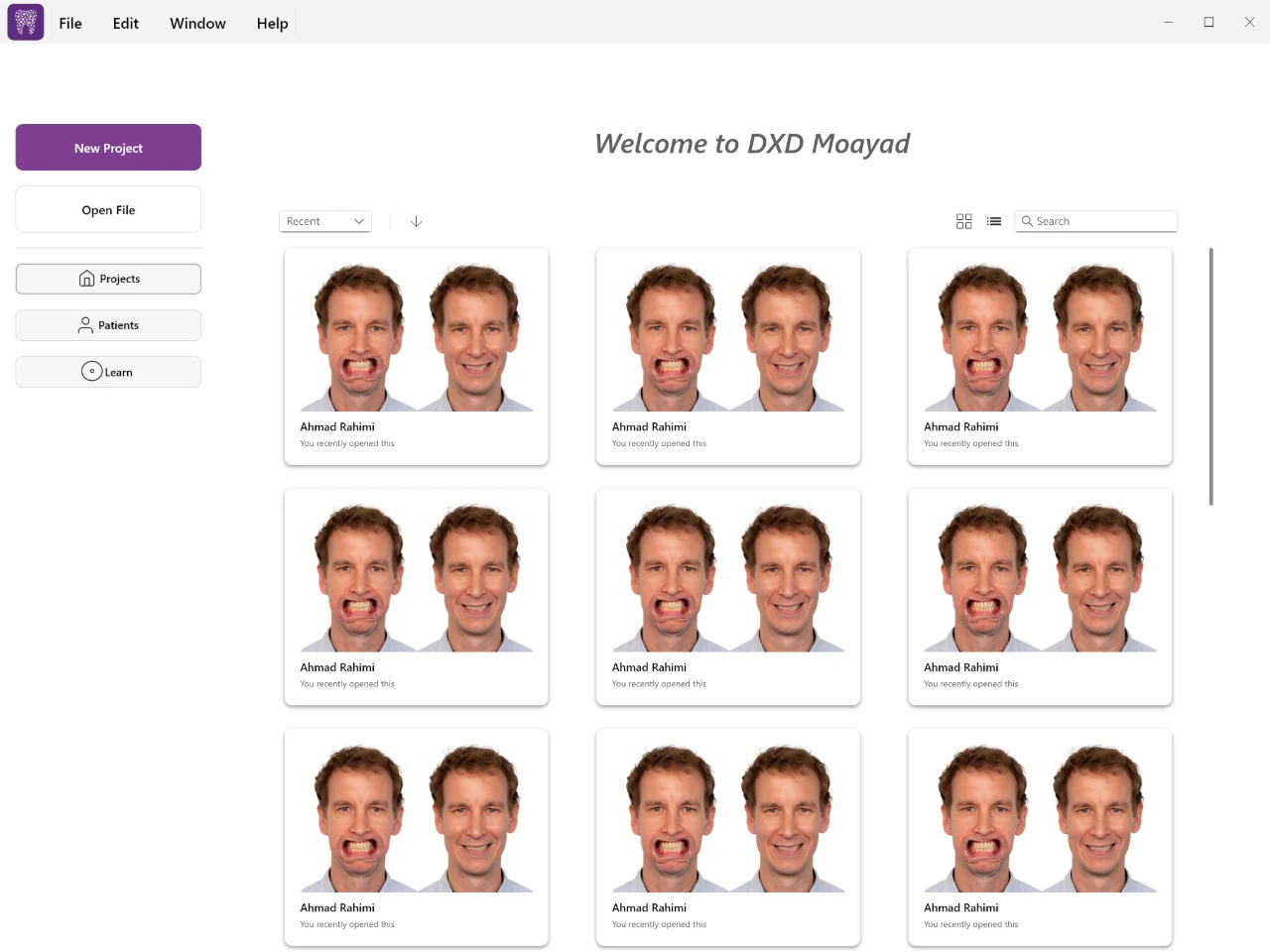
The application home in the DXD+ desktop application
The application homeThe desktop application: recent work as case cards, each showing the smile and retracted photographs for that patient, with new-project, open-file, projects, patients and learn entries alongside. Photo-based smile design has to start from the case images, so every card carries them.

Application references supplied with the project: Windows desktop captures of DXD+ running on a real case, from the case grid to 3D scan matching. The separate interactive experience is a browser recreation of the same ideas.

THE FULL WORKFLOW

Every detail has a tool.

Every point introduces one part of DXD+. Explore the complete feature list here at any time.

01

Plan in two dimensions.

Smile design
  • Patient and tooth-selection setup, smile and retracted photo import, photo matching and image adjustment.
  • Facial reference points, measurement calibration, editable guidelines and proportion controls.
  • A layered 2D workspace for placing tooth templates over photographs and adjusting the composition.
02

Bring the scan into the picture.

Scan preparation
  • Import upper and lower scan meshes and align them using corresponding reference points.
  • Clean up scan geometry and define per-tooth margin lines through an interactive surface workflow.
  • Connect scan preparation, photo matching and tooth placement across dedicated setup views.
03

Start from anatomy. Make it your own.

Template libraries
  • Load upper and lower tooth libraries from the custom .dxdtemplate format.
  • Place, transform and mirror teeth; manage teeth and scans in an organized scene outliner.
  • A separate TemplateEditor prepares reusable tooth meshes, masks, thickness maps and library previews.
04

Shape the surface directly.

Sculpting tools
  • Add/remove, smoothing, grab, angle grab and normal-constrained tools edit tooth geometry directly.
  • Cusp and ridge brushes provide more specific anatomical editing operations, alongside a thickness brush.
  • Brush radius and strength control the affected area. Vertex changes and normal updates feed straight back into the viewport.
  • The browser experience demonstrates normal displacement and adjacency-based smoothing, with an undo step for each stroke.
05

Look beneath the surface.

Geometry analysis
  • Distance and thickness visualization work alongside cement-gap and material-thickness settings.
  • The desktop clearance-repair system combines a triangle BVH, sparse Eigen solves and as-rigid-as-possible deformation.
  • Margin anchors, cervical transition weights, edge/triangle checks and intersection checks constrain repair attempts.
  • Repair results distinguish complete, partial, invalid and cancelled work. This browser demo does not run the repair solver.
06

Move between making and inspecting.

Viewport tools
  • Custom 2D/3D viewports, orbit controls, transform handles, tooth selection, outlines and multiple shading modes.
  • Lighting controls, notes, measurements and visibility tools support detailed review of a design.
  • Dockable tools and shared DXDCore controls keep the application’s different workspaces connected.
07

Keep the work editable.

Project workflow
  • Custom binary project serialization and autosave preserve application state.
  • Command-based undo/redo supports transactions and grouped changes across UI and mesh editing.
  • Export preparation and OBJ, STL and PLY output connect the design workspace to other geometry tools.
  • Application logging, desktop packaging and hardware-backed licensing support distribution and maintenance.
08

Build tools that build more tools.

Supporting modules
  • TheoryEngine supplies a C++ entity/component system, geometry and math utilities, OpenGL rendering, asset import and UI infrastructure.
  • DXDPipeline and DXDImageFilters provide reusable processing steps, including color, intensity, blur, edge, threshold and morphology filters.
  • Optional x64 ONNX Runtime filters detect facial features and generate masks and overlays.
  • DXDNodes supplies graph documents, typed ports, connections, a node canvas and serialization. DXDNodesApp and DXDGeometryNodes are separate tools in the repository.
  • An Android native build shares the core C++ sources through the NDK and an OpenGL ES rendering path.
THE ORIGINAL TOOLKIT

Built close to the metal.

Core application

  • C++20
  • TheoryEngine
  • DXDCore
  • ECS
  • Command pattern

A custom engine and reusable UI layer beneath the desktop dental editor.

Graphics & interface

  • OpenGL
  • GLSL
  • GLFW
  • GLEW
  • Dear ImGui
  • XML UI

GPU buffers, shaders, viewports, docking and the engine’s component-based UI system.

Geometry & files

  • Eigen
  • Triangle BVH
  • ARAP
  • OBJ / STL / PLY
  • Binary serialization

Mesh navigation, spatial queries, deformation, import/export and custom project/library formats.

Processing modules

  • DXDPipeline
  • DXDImageFilters
  • ONNX Runtime
  • DXDNodes

Reusable image-processing and graph-editor modules; optional facial-feature inference on x64.

Desktop delivery

  • CMake
  • MSVC
  • CTest
  • CPack / NSIS
  • GitLab CI
  • Rockey4ND

Windows builds, geometry tests, installer packaging and hardware licensing.

Android target

  • Android NDK
  • Gradle
  • CMake
  • EGL
  • OpenGL ES 3
  • Native app glue

A native Android target sharing engine, core and DXD+ source selection.

Have a similarly specialized problem?

Let’s make the difficult part visible and usable.

Discuss a project Browse all work